Camera endoscope
- 3.3
- Rating
- 100.00K
- Installs
- Free
- Price
 Analysis by App-foxy
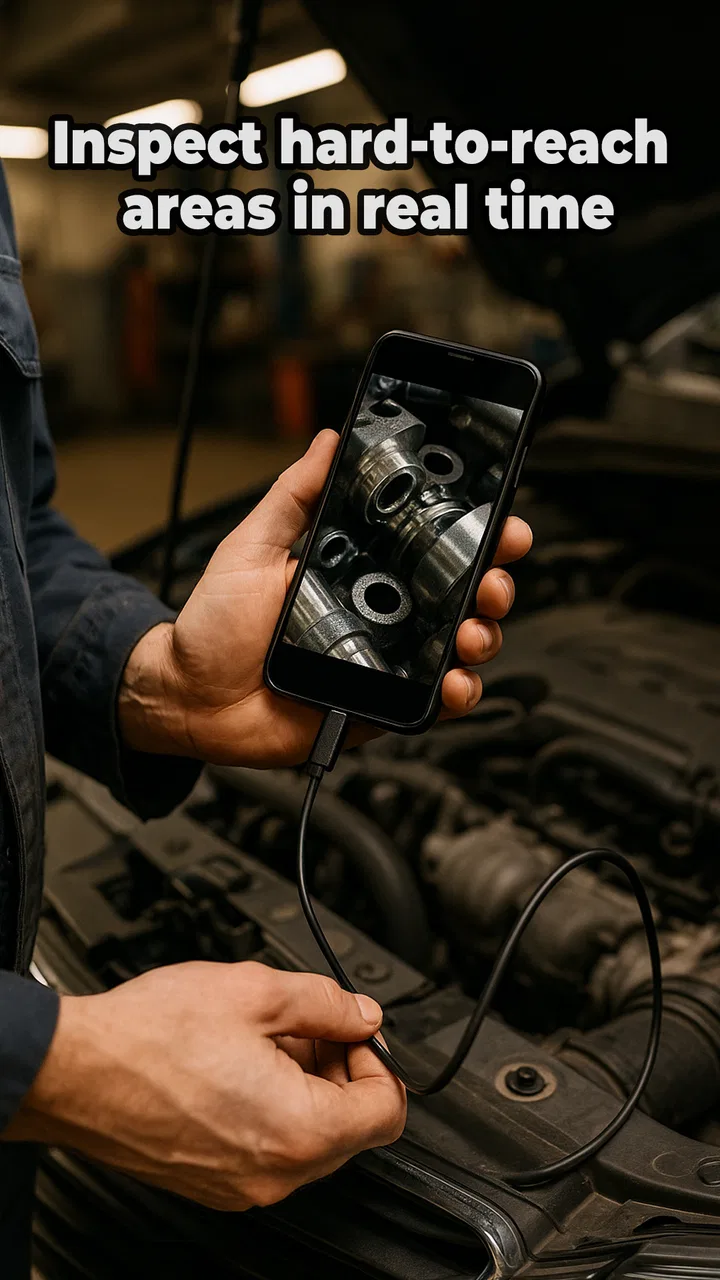
I found Camera endoscope most useful when I stopped thinking of it as a normal camera app and treated it as a viewing tool for places my phone could not reach. With a compatible USB endoscope camera connected, it can turn a small Android device into a practical inspection screen for narrow, dark, or awkward spaces. That makes it relevant for checking behind furniture, looking inside a pipe opening, examining a cable route, or simply exploring objects that are difficult to see directly.
My overall impression is mixed but positive. The idea is straightforward, the app is free to install, and the interface is aimed at getting you to the live camera view rather than surrounding the task with unnecessary extras. At the same time, the experience depends heavily on the endoscope hardware, the phone’s USB compatibility, lighting, and how comfortably you can hold and guide a flexible camera. The application can make inspection easier, but it cannot remove every physical or technical obstacle.
How Camera endoscope works in everyday use
Camera endoscope is a free app from Fa9ssa in the Libraries & Demo section. Its main purpose is to display the feed from a USB endoscope camera, with the emphasis on viewing hidden areas in high definition when the connected camera supports that level of image quality. It is currently at version 13.0, supports Android 7.0 and later, and is marked suitable for Everyone. The app has passed over one hundred thousand installs and holds an average rating of 3.5 from around one thousand ratings, so it has a meaningful user base while still leaving room for a few rough edges.
You May Also Like

 Blood Strike: 2.5 Anniversary
Blood Strike’s Loadouts Turn Every Drop Into a Tactical Gamble
A close look at Blood Strike’s custom loadouts: how fast access to signature weapons reshapes its battle royale rhythm, rewards preparation, and narrows the gap between fights.

 Pandora - Music & Podcasts
Pandora’s Music Is Easy to Start, but Harder to Recover
Pandora’s strength is its low-effort path from a seed to a station. Its weak spot is how much confidence it asks you to place in connection, setup, and quiet recovery.

 8 Ball Pool
 Is Built on Rivalries, Rematches, and Routine
A close look at the rivalries, rematches, shared routines, and unanswered safety questions that turn a quick pool match into a persistent mobile community.

 Samsung Music
’s Quiet Strength Is Playing What You Already Own
Its reach comes less from spectacle than from dependable access to a personal library. That simplicity is both the app’s strongest retention engine and its ceiling.

 AccuWeather: Weather Radar
AccuWeather Review: A Quick, Clear Forecast for Everyday Decisions
For everyday plans, the best forecast is the one you can understand quickly. AccuWeather makes rain timing, radar, and local conditions easy to act on, with a few trade-offs.

 Hill Climb Racing
Why Hill Climb Racing Still Turns Crashes Into One More Run
A tiny car, a bumpy hill and one more upgrade: Hill Climb Racing keeps resurfacing because its simple chaos makes every near-miss feel personal.
More From Our News Desk
View All News


The first thing I would clarify for a new user is that the app is not an endoscope by itself. You need a compatible USB camera and a phone or tablet that can communicate with it. This distinction matters because many disappointing first attempts are caused by the camera, adapter, cable, or device connection rather than the viewing software. If you already own a USB inspection camera, this app gives that accessory a useful screen. If you do not, installing it alone will not let you inspect hidden spaces.
In a typical setup, I would connect the camera, attach the necessary USB adapter if the phone uses a different connector, and open the app with the camera positioned somewhere safe. The practical goal is immediate feedback: move the probe slightly, watch the display, and adjust the angle until the area comes into view. That direct relationship between movement and image is more important here than a long list of camera controls.
Readability and navigation during inspection
The most accessible aspect of this type of app is its basic visual purpose. When the live feed is visible at a useful size, I can concentrate on the object being inspected instead of trying to look through a tiny lens at the same time. That separation is valuable for anyone who finds close visual work tiring, including people who need to enlarge what they are examining or who have difficulty maintaining a precise viewing angle.
A larger phone or tablet can make the screen easier to study, although a larger device may be less convenient to carry while guiding the probe. This is one of the first trade-offs I noticed: readability improves with screen area, but handling becomes more demanding. For a fixed inspection, placing the device on a stable surface can help. For a moving task, a smaller phone may be easier to hold, even if the image feels more cramped.
I also prefer to prepare the workspace before opening the live view. Clearing the area, placing the phone where it will not slide, and keeping the cable away from the probe reduces the need to make several adjustments at once. This is not an advanced app feature, but it changes the experience considerably. A simple setup is easier to navigate for someone with limited dexterity, reduced balance, or difficulty switching attention between the screen and the physical camera.
The app’s value is strongest when the user can understand the image quickly. A live endoscope feed can be visually confusing because the camera may be rotated, the lens may face a wall, or the lighting may create glare. I recommend moving the probe in very small increments and pausing after each movement. That rhythm is more manageable than sweeping the camera around quickly, especially for users who need extra time to interpret changing images.
For low-vision users, the screen may be helpful because it brings a remote view closer and avoids the need to place the face near a cramped opening. However, I would not assume that every feed will be equally clear. Image quality depends on the connected camera, the distance from the subject, the lens, and the built-in illumination. A poor camera cannot be made sharp simply by displaying it through this app.
Motor and sensory considerations
Using an endoscope is a two-handed activity for many people: one hand guides the flexible cable while the other holds the phone. That can be awkward for users with limited hand strength, tremor, joint pain, or reduced coordination. Camera endoscope helps by moving the viewing point onto the screen, but it does not automatically solve the physical task of positioning the probe. I found that the best approach is to support the phone first and then use slow, deliberate movements with the camera.
A phone stand, a stable table, or another safe support can make a meaningful difference. It reduces the grip required and leaves more attention for guiding the cable. For an inspection behind a cabinet, I would rather place the phone beside me than hold it in the air while reaching into the gap. This setup also makes the display easier for another person to observe, which is useful when one person can guide the camera and another can interpret what appears on screen.
People who are sensitive to rapid motion may find a constantly moving feed uncomfortable. The practical solution is to move slowly, stop often, and avoid rotating the probe unnecessarily. The app is not a substitute for a specialized accessibility interface, but the user can create a calmer experience through the way the hardware is handled. That distinction is important: the application supports remote viewing, while much of the comfort comes from the surrounding workflow.
Lighting presents another sensory challenge. Endoscope cameras commonly use small lights near the lens, and a bright surface close to the camera can wash out detail. In a narrow space, a slight change in angle may reveal more than increasing brightness. I learned to look for edges, shadows, and reflections rather than expecting a perfectly balanced image. If the image appears blank, the camera may simply be facing a surface too closely or sitting in a space with no useful angle.
For users with hearing loss, the core task is primarily visual, so spoken instructions are not essential to understanding what is on screen. That can make the app practical in a quiet, visual inspection workflow. On the other hand, anyone relying on audio cues from a connected accessory should not assume that this setup will provide them. The important information is the camera image, and the usefulness of that image remains dependent on the hardware.
Situational access: where the app earns its place
The clearest everyday use is checking something that is visible only from an uncomfortable position. Imagine a small object rolling under a sofa. Instead of lying on the floor and reaching blindly, I can guide the endoscope into the gap while watching the screen from a more comfortable position. The app does not retrieve the object, but it can show whether the object is there and where it sits before I decide how to reach it.
Another useful situation is inspecting a cable path behind a desk. A direct view may require moving the desk or twisting into an awkward posture. With the camera at the back and the phone in front, I can identify which cable is connected, check whether a connector is loose, or see whether something has fallen behind the furniture. This is especially helpful when bending, kneeling, or reaching overhead is difficult.
Home maintenance is a reasonable use, but I would keep expectations practical. The app can help with visual checking around accessible openings, vents, gaps, and non-dangerous areas. It is not a replacement for a qualified professional when the inspection involves electricity, gas, structural damage, machinery, or any situation where inserting a camera could create danger. The screen may show a problem, but it does not make the surrounding task safe.
For hobby work, Camera endoscope can be a convenient second set of eyes. I can imagine using it to look inside a model, inspect a hard-to-see part of a bicycle, or examine the interior of a box without dismantling it immediately. The benefit is not just curiosity. Seeing the layout first can prevent unnecessary disassembly, which is useful for people who have limited energy or find repeated fine-motor work tiring.
It also works well as a shared viewing tool. A person who cannot comfortably lean over a workbench can watch the phone while someone else positions the camera. This arrangement supports different abilities without pretending that the app itself provides a complete accessibility system. The person viewing the display can give directions, identify a part, or decide when the camera has reached the right location.
For children, the Everyone rating reflects the broad age suitability of the app itself, but supervision still matters in real use. The cable, connector, small camera head, and the places being inspected may not be appropriate for unsupervised exploration. I would use it as a supervised discovery tool rather than leave a child to experiment around outlets, appliances, drains, or moving equipment.
What it does better than usual alternatives
The usual alternative is simply using a phone flashlight and trying to look directly into the space. That is faster when the opening is large and the subject is close, but it fails once the viewing angle becomes narrow. An endoscope setup changes the geometry: the camera goes into the gap while the screen stays where the user can see it. For awkward spaces, that is the app’s main advantage.
Another alternative is taking repeated photographs with a regular phone camera. Photos can be useful when the target is stationary and reachable, but they require placing the phone in the right position, taking the image, pulling it back, and trying again. A live feed is more efficient for navigation because I can see the result of a small movement immediately. The trade-off is that the live image may be harder to interpret than a carefully framed photo.
Dedicated inspection monitors can be easier for a single purpose because the camera and display are designed as one unit. They may also avoid the adapter and compatibility questions that come with a phone. Camera endoscope is more appealing when I already have an Android device and want to reuse it as the display. The phone approach is flexible, but it places more responsibility on the user to match the camera and connection correctly.
Compared with a standard camera app, this application is more focused on the USB endoscope workflow. A normal camera app may not recognize the external feed at all, while this app is intended to show it. That focus is useful, but it also means I would not choose it for ordinary photography, editing, or general video recording. Its strength is a narrow one, and that is perfectly acceptable if the task matches it.
Remaining barriers and practical friction
The biggest barrier is compatibility. A user can install the app successfully and still fail to see an image because the endoscope, adapter, phone, or connection does not work together. Before relying on it for an urgent inspection, I would test the complete setup in a well-lit room. That simple test separates a software problem from a hardware problem and avoids trying to diagnose everything while reaching into a difficult space.
Physical access remains another limitation. The app can keep the display in a comfortable position, but the probe still has to enter the space. If the camera cable is stiff, slippery, or difficult to steer, users with limited grip or coordination may need another person’s help. I would not describe the app as hands-free. It reduces the need to place your eyes and face at the inspection point, but it does not eliminate the need to control the camera.
Image interpretation can also be demanding. A close-up view may look abstract until the user recognizes an edge or familiar shape. Rotating the camera can make left and right feel reversed, and a flexible cable does not always move in the direction expected. I recommend marking the cable’s orientation mentally or using a slow quarter-turn approach. That small technique makes navigation less frustrating than making large random movements.
The free price makes experimentation easy, but the presence of in-app purchases priced at $13.99 per item is worth keeping in mind before committing to paid extras. I would first establish that the basic connection and viewing workflow meet my needs. For occasional household checks, paying for additional functionality may not be worthwhile; for repeated technical inspections, the decision depends on what those extras provide and how often the app will be used.
The rating of 3.5 suggests a serviceable experience rather than universal satisfaction. I read that as a reason to keep expectations realistic. This is a focused utility, not a polished professional inspection platform. Users who need guaranteed image quality, specialized measurement tools, or a rugged integrated system may be better served by dedicated equipment. Users who mainly need a screen for an existing USB camera may find the simpler approach more economical.
Who should use it, and who should choose something else
I would recommend Camera endoscope to Android users who already own a compatible USB endoscope and want a straightforward way to view its feed. It is especially suitable for occasional home inspection, hobby projects, checking behind furniture, and situations where bringing the eyes closer to the subject is uncomfortable. It can also support cooperative work, with one person handling the probe and another watching the display.
I would be more cautious about recommending it to someone who expects the app to include the camera hardware, automatically solve connection problems, or provide professional diagnostic certainty. It is also not my first choice for users who need a fully integrated device with minimal setup. In those cases, a dedicated endoscope with its own display may be easier, even if it costs more.
For users with visual, motor, or positional limitations, the app is most useful as part of a planned setup rather than as a standalone accessibility solution. Use a supported phone at a comfortable viewing distance, stabilize the device, improve the lighting conditions, and ask for assistance with the probe when necessary. Those steps can turn a frustrating inspection into a manageable one, but they require preparation outside the app.
One detail I appreciate is that the application’s purpose is easy to understand. I do not need to learn a complex creative workflow before reaching the useful part. The challenge is mostly making the camera and the physical environment cooperate. That is a fair exchange for a tool designed around a very specific job.
My inclusive verdict
After looking at Camera endoscope through the lens of different abilities and situations, I see it as a practical bridge between a USB inspection camera and an Android screen. Its strongest contribution is positional: it lets the user observe a remote or hidden area without putting the face and phone in the same awkward place. That can improve comfort, reduce unnecessary bending, and make shared inspection easier.
Its limitations are just as important. The app cannot guarantee that every camera works, cannot steer the probe, and cannot make hazardous inspection safe. Users with limited dexterity may still need support, while users with low vision may benefit only if the connected camera produces a sufficiently clear image. The best experience comes from combining the app with stable positioning, slow movements, good lighting, and realistic expectations.
For a free utility in the Libraries & Demo category, I think it is worth trying if you already have the right USB endoscope hardware. I would begin with a simple test rather than purchase anything specifically for it, and I would judge the setup by one real task: can I see and guide the camera comfortably without repeated connection or handling problems? If the answer is yes, Camera endoscope can be a handy addition to a toolbox.
My recommendation is conditional but genuine: choose it for accessible remote viewing and occasional exploration, not as a replacement for professional inspection gear or a complete hands-free solution. The app earns its place when the ordinary camera view is physically inconvenient, and it is most inclusive when the user treats the phone, camera, workspace, and assistance from others as one combined system.
FAQs for Camera endoscope
01What is Camera Endoscope and what can I use it for?
Camera Endoscope is an app designed to work with compatible inspection cameras, borescopes, or USB endoscope devices. After connecting supported hardware, it can display a live image on your Android or iOS device, helping you inspect areas that are difficult to reach, such as pipes, engines, vents, walls, and small mechanical parts. Its usefulness depends heavily on the camera and connection method you own.
02Does Camera Endoscope work without an endoscope camera?
The app generally requires compatible endoscope hardware to provide its main inspection function. Installing it alone will not normally turn your phone into a professional borescope, because the application needs a camera module connected through USB, Wi-Fi, or another supported method. Before downloading, check the app description and your device specifications to confirm that your particular endoscope camera and phone are compatible.
03Is Camera Endoscope compatible with both Android and iPhone?
Compatibility can vary between Android and iOS versions, phone models, and the type of endoscope being used. Some USB cameras require Android devices with USB OTG support, while iPhones may need a Wi-Fi adapter or a camera specifically designed for Apple devices. Review the developer’s compatibility information carefully, and confirm the required permissions, adapters, and operating-system version before installation.
04Can I take photos or record videos with Camera Endoscope?
Depending on the version and connected hardware, Camera Endoscope may allow you to capture inspection images or record video from the live camera feed. These features are useful for documenting plumbing problems, equipment damage, maintenance work, or areas that need professional attention. Storage access may be required, and the available resolution will usually depend more on the connected camera than on the app itself.
05Is Camera Endoscope easy and safe to use?
The app is usually straightforward: connect the compatible endoscope, grant the requested permissions, open the live view, and adjust the camera position using the flexible cable. However, users should avoid forcing the probe into narrow spaces, exposing non-waterproof equipment to liquids, or using it near live electrical sources unless the hardware is specifically rated for that purpose. Always follow the camera manufacturer’s safety instructions.
Pros
- Works with many USB OTG endoscope cameras.
- Live preview helps inspect tight or hard-to-reach spaces.
- Useful for home repairs
- plumbing
- and basic maintenance.
- Simple controls make it accessible for first-time users.
- Can help identify problems before calling a professional.
Cons
- Requires a compatible endoscope camera and OTG adapter.
- Image quality depends heavily on the connected camera.
- Some devices may not support USB OTG properly.
- Limited usefulness without additional inspection accessories.
- Lighting and focus can be difficult in very narrow areas.

Camera endoscope
Gallery